Etsy Mockups That Sell: A Photo Checklist for POD Listings
Etsy mockups that sell: a 10-slot photo plan for POD listings, what your first photo must do at thumbnail size, accurate colors, alt text and a consistent shop.
By the POD Made Easy team · September 24, 2026 · 10 min read
Etsy mockups that sell do three jobs. The first photo wins the click at thumbnail size, the next few answer a buyer’s questions about fit, color, size and print, and every image shows the product the buyer will actually receive. Etsy allows mockups for print-on-demand (POD) designs, so you don’t need a photoshoot, but you do need a plan.
This checklist gives you a 10-slot photo plan for POD listings, the rules your first photo has to follow, how to keep mockups accurate, how to write alt text, and a quick way to make your whole shop look like one brand.
Key takeaways
- Etsy allows stock-photo mockups for your original designs printed by a production partner, as long as they show the product buyers will receive.
- Your first photo should be one clear, well-lit image of the finished product. Etsy’s search visibility guidance rules out collages as the primary photo.
- Plan 8–10 images per listing: hero, lifestyle, close-up, print placement, colors, size chart, and gift or personalization shots where they fit.
- Match the mockup to the real blank, the real print size and colors that actually print. Accurate mockups prevent returns and bad reviews.
- Write alt text (up to 250 characters) for each photo. If you don’t, Etsy may add AI-generated alt text for you.
Are mockups allowed on Etsy?
Yes, for POD. Etsy’s Listing Image Requirements generally ask for original photos of the actual product rather than renderings or stock photos, with two exceptions. One of them is you: if you create an original design that a production partner prints onto a base item like a t-shirt or mug, you may use a stock photo mockup to illustrate the end product.
The other exception comes with a catch. For personalized items, your first image must show a finished, customized item similar to what the buyer will receive. A blank product or a mockup with placeholder text such as “Your Text Here” isn’t allowed as the main image, though computer-generated mockups can show customization options in later photos. If you sell custom-name products, our personalized POD guide covers the rest of the setup.
Two conditions sit under all of this. The mockup has to depict the product the buyer will get, and by uploading an image you confirm you have the rights to use it, which matters when you buy mockup templates.
What your first photo has to do
Etsy’s search visibility page spells out what it wants from a primary photo: high resolution (it recommends at least 2000 px on both sides), a single image of the finished product rather than a collage or stitched-together image, and clear, even lighting. Listings that fall short can get less visibility in search, so treat these as rules, not tips.
Beyond Etsy’s rules, run a thumbnail test before you publish. Shrink photo 1 to the size of a search result on your phone and ask three questions:
- Can you tell what the product is (tee, sweatshirt, mug)?
- Can you read the words or recognize the main image of the design?
- Can you tell who it’s for (a nurse, a birder, a grandma)?
If any answer is no, fix it before the listing goes live. The usual fixes are a tighter crop, a flat lay or hanging shot instead of a full-body model, a calmer background, or a shirt color with more contrast against the ink. The hero color doesn’t have to be your best seller; it should be the one where the design reads best (our t-shirt colors guide helps you pick). Keep the product centered with space around it, because Etsy crops thumbnails to several shapes; the exact sizes are in our Etsy image sizes cheat sheet.
The 10-slot photo plan for POD listings
Etsy gives you up to 20 photos and 2 videos per listing. You rarely need all of them, but each slot below answers a question buyers would otherwise ask in a message, or not ask at all and leave.
| Slot | What to show | Why it helps |
|---|---|---|
| 1. Hero | Flat lay or hanging shot in your best-contrast color, design large and centered | Wins the click in search |
| 2. Lifestyle | The product worn or in use in a setting your buyer knows: a trailhead, a classroom, a kitchen | Helps buyers picture it in their life |
| 3. Close-up | The design at print size with the fabric texture visible | Shows detail and makes small text readable |
| 4. Placement and scale | A front view on a body or form showing where the print sits and how big it is | Prevents “the print was smaller than I expected” |
| 5. Color options | A grid of every color you offer, labeled with the same names as your variants | Answers “what does it look like in navy?” |
| 6. Size chart | Measurements for the exact blank, from your provider’s size guide | Cuts wrong-size orders and returns |
| 7. Extra print areas | Back, sleeve or neck print, if the product has one | Shows everything the buyer pays for |
| 8. Gift or occasion | A styled gift or seasonal scene | Speaks to buyers shopping for someone else |
| 9. Personalization or set | A finished example with a sample name, or matching products such as family tees | Shows the option and can lift order size |
| 10. Materials and care | Fabric, fit and washing notes from your provider | Answers pre-sale questions and sets expectations |
| Video (up to 2) | 5–15 seconds: a slow pan, a color flip-through or a video mockup | Etsy says videos can help how listings appear in search |
Our recommended order for apparel. For mugs, swap slot 4 for an in-hand shot that shows scale. Grids and charts are fine in later slots.
How to keep mockups accurate (and avoid returns)
A mockup that flatters the product more than the product deserves gets you the sale and then the refund. The checks that matter most:
- Match the blank. T-shirt models differ in neckline, fit and fabric weight. Printify’s own advice when choosing third-party mockups is to check details like necklines on tees and handles on mugs, and to make sure custom mockups closely match the actual product.
- Match the colors. Screens show colors that ink can’t reproduce, especially neons. Printify’s product creator can preview mockups in RGB (brighter) or CMYK (closer to the printed result), and the choice carries through to the mockups it sends to Etsy. If your palette is bright, use the CMYK preview; our RGB vs CMYK guide explains why.
- Match the print size. Don’t enlarge the design on a mockup beyond what will print. A chest print shown twice its real size is the fastest route to a disappointed buyer.
- Show textures honestly. Heather and garment-dyed fabrics look mottled in real life, and that’s part of their appeal. Use mockups that show it.
- Be clear about props. A styled scene with a mug and flowers is fine, but your description should make plain what’s included.
- Photograph a sample of your best sellers. A real photo doubles as a quality check, and it stands out among listings that all use the same stock scenes.
AI lifestyle mockups follow the same rule: they’re fine as long as they show the real product accurately. If they include AI-generated people, note that a New York law (Senate Bill S8420-A), in effect since June 2026, requires advertisers to disclose synthetic performers, and Printify’s guidance treats marketplace listing mockups as likely in scope. That’s separate from Etsy’s requirement to disclose AI-made designs, which our guide to selling AI designs on Etsy covers. None of this is legal advice.
Make your whole shop look consistent
Etsy notes that your first photo sets the shape of the photos that follow, and it recommends using one shape throughout for a more cohesive look. The same idea works at shop level: when every hero photo shares a background, light and angle, your shop page reads as a brand instead of a pile of experiments.
- Build one template set per product type: a hero layout, a lifestyle scene family, a color chart and a size chart for each blank you sell.
- Keep the hero background family the same across the shop, for example warm white linen for apparel and a light wood table for mugs.
- Coordinate your featured listings. Etsy’s Seller Handbook suggests choosing featured items whose main photos coordinate in background, lighting and color.
- Name files by product, color and slot (tee-heathernavy-01) so batches stay organized.
Designs that read at thumbnail size
Describe the idea and the exact words, pick one of four drafts, and POD Made Easy delivers a print-ready final with spell-checked text. It then creates the product in your own Printify shop, where Printify generates the mockups for you to order and publish.
Start your free trialTry this idea in POD Made Easy
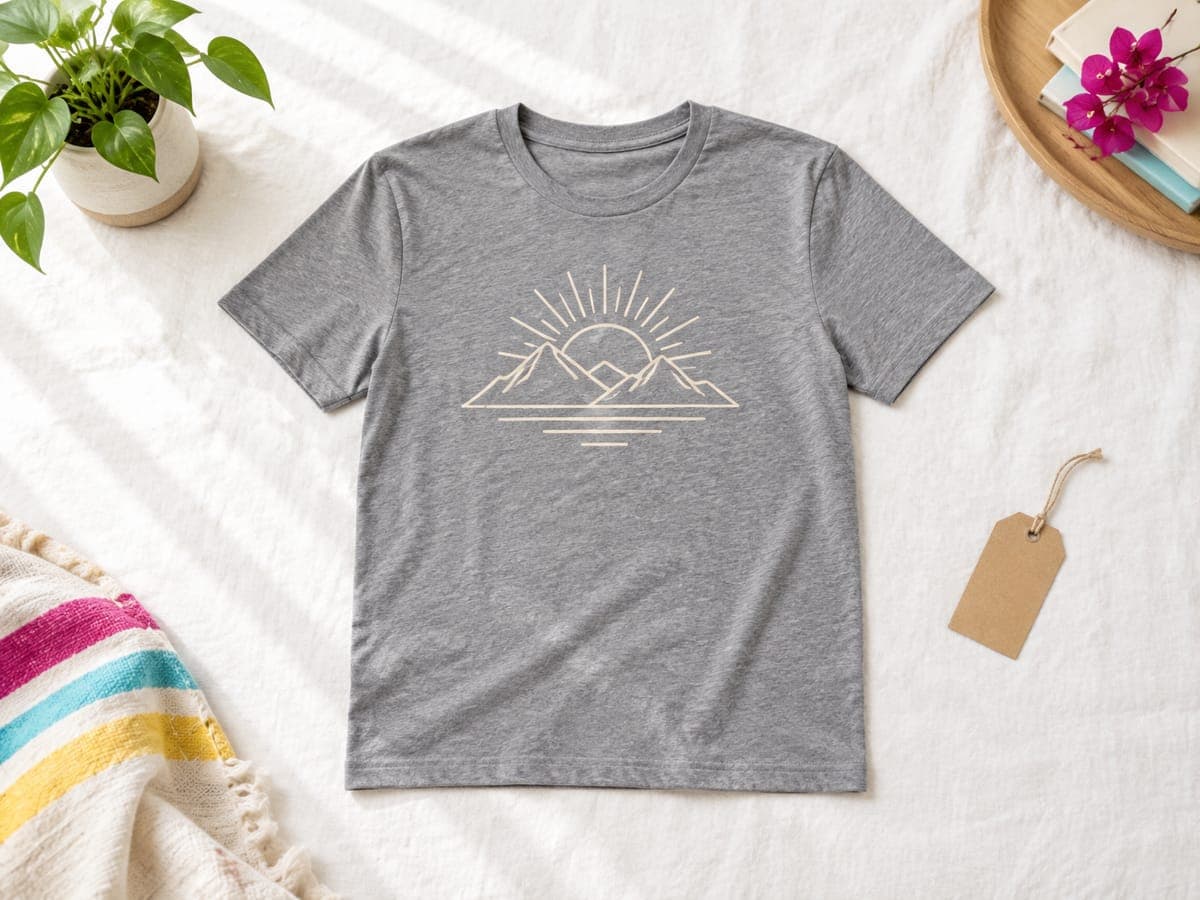
“Bold line-art badge of a mountain sunrise with thick outlines that stays readable at small sizes, cream ink for a dark tee” · text: “Happiest on the Trail”
Alt text for Etsy listing photos (with examples)
Alt text describes each image for shoppers who can’t see it, including screen reader users and search engines outside Etsy. If your shop language is English, you can add up to 250 characters per photo. If you don’t, Etsy may add AI-generated alt text to US sellers’ listings, which you can edit later.
Etsy also says that repeating your title, tags or shop name in alt text gives no extra SEO benefit, so describe what’s actually in the picture. To add it, open the listing in Shop Manager, select a photo, fill in the Alt text section and select Apply. A few examples:
- Hero: “Heather grey t-shirt laid flat with a cream line-art mountain sunrise across the chest, on white linen.”
- Lifestyle: “Person in a forest green t-shirt with a mountain sunrise print, standing at a trailhead holding a travel mug.”
- Size chart: “Size chart for a unisex t-shirt listing chest width and body length in inches for sizes S to 3XL.”
- Color chart: “Nine t-shirt colors side by side, from white and natural to heather grey, navy and black.”
Mockup mistakes that cost sales
- A color grid or collage as photo 1. Move it to slot 5.
- Placeholder text on a personalized listing. Show a finished example with a sample name.
- A mockup blank that isn’t the blank you sell, such as a boxy heavyweight tee on a listing for a slim-fit shirt.
- Colors that can’t print, especially neons, shown at full screen brightness.
- Low-resolution mockups under 2000 px, which look soft once Etsy compresses them.
- Transparent PNG mockups, which show up on Etsy with a black background.
- More than 20 mockups selected in Printify, which makes publishing to Etsy fail.
- The most-used stock scenes. If buyers have seen the same model in the same pose on other shops, your listing blends in.
Test and improve your photos
Photos are the easiest part of a listing to test. Change one thing at a time, usually photo 1, give it two to four weeks, and compare views, favorites and orders in your stats before and after. Our Etsy stats guide shows where to find each number, and if a listing gets plenty of views but no orders, work through our views-but-no-sales fixes before you touch the price.
Two more habits pay off. Refresh lifestyle photos when the season changes, and check the search visibility page in Shop Manager every few weeks for photo issues Etsy has flagged. When you need new mockups, our t-shirt mockup generator comparison covers the free and paid options, and the Etsy SEO guide covers everything else that gets a listing found.
Frequently asked questions
- Can I use Printify mockups on Etsy?
- Yes. Etsy allows stock-photo mockups for original designs that a production partner prints onto a base item. Printify generates mockups for every product and publishes them with the listing, and you can upload your own as long as they closely match the real product.
- How many photos should an Etsy listing have?
- Etsy allows up to 20 photos and 2 videos. For a POD listing, 8–10 images usually cover it: a hero shot, lifestyle, close-up, print placement, color options and a size chart, plus gift or personalization shots where they apply.
- Should my first Etsy photo be a model or a flat lay?
- Test both, but a flat lay or hanging shot usually shows the design biggest at thumbnail size, which helps it get clicked. Save model and lifestyle shots for photos 2 and 3, where buyers look for fit and context.
- Do I have to disclose AI-generated mockups on Etsy?
- Etsy’s AI disclosure rule covers items and designs made with AI. For mockups, the rule is accuracy: they must show the product buyers receive. Separately, a New York law in effect since June 2026 requires ads to disclose AI-generated people. This isn’t legal advice.
- Where do I get a size chart for my POD listings?
- Use the measurements your provider publishes for the exact blank you sell, not a generic chart. Printify and Printful both provide size guides for their products. Add the chart as an image and repeat the key numbers in your description.
Keep reading
More etsy seo guides
Etsy SEO
Etsy Image Sizes (2026): Every Photo, Banner and Icon Size
Every Etsy image size for 2026 in one table: listing photos, thumbnails, big and mini banners, shop icon, profile photo and video, checked on Etsy Help.
Sep 24, 2026 · 11 min read
Etsy SEO
Etsy SEO in 2026: The Complete Guide for POD Sellers
Etsy SEO for print-on-demand in 2026: how Etsy search matches and ranks listings, what goes in titles, tags, attributes and photos, plus a one-page checklist.
Sep 24, 2026 · 13 min read
Etsy SEO
Etsy Description Template for POD (Copy-Paste Examples)
A copy-paste Etsy description template for print-on-demand, with full t-shirt, mug and poster examples, AI disclosure lines and what Etsy search reads.
Sep 24, 2026 · 11 min read